
HipTorque1.0 - App Store
You'll be able to see results in few seconds.
Publisher Description
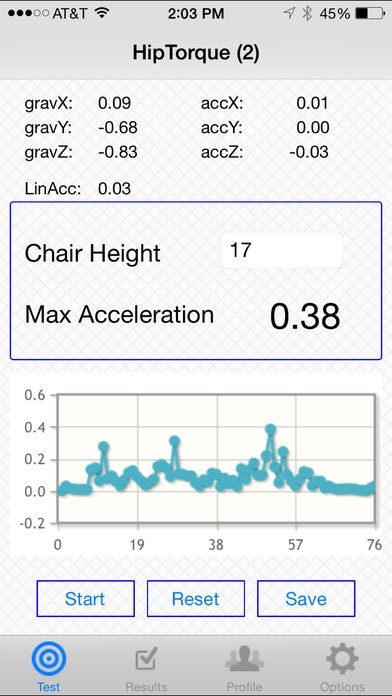
How we sit makes a big difference for how the body works.
Find the best sitting position for office chair by using iPhone built-in sensors.
Slumped sitting is the most common ergonomic problem in sitting. Many ergonomic chairs will prevent slumping when the strongest leg position is determined.
The HipTorque application is a simple way to measure leg strength to balance the body in strong posture, and good body support. A chair and workstation that are adjusted for leg strength encourage active movement and minimize slumped sitting.
HipTorque is based on the patent pending system proven with hundreds of clients over the period of 10 years.
= HipTorque method =
1. Set different chair heights
2. Measure acceleration with the app - for each height
3. Review the report. The chair hight with max acceleration is the best height for you
Repeat once a month.
= HipTorque Features =
- Height value - units agnostic
- Acceleration chart for every measured height
- Measure as many levels as you need
- Sound indicating peak acceleration
- Personal profile
- Auto-stop timer (stops measurement after 30 seconds or less)
- Build-in video tutorial
- Options: Low pass filter
- Detailed acceleration and gravity values for 3 dimensions
HipIndex and HipTorque are the trademarks of ErgonomicsFirst.
Patent pending
Requires iOS 7.0 or later. Compatible with iPhone, iPad, and iPod touch.
About HipTorque
The company that develops HipTorque is Alex Kouznetsov. The latest version released by its developer is 1.0.
To install HipTorque on your iOS device, just click the green Continue To App button above to start the installation process. The app is listed on our website since 2015-02-25 and was downloaded 0 times. We have already checked if the download link is safe, however for your own protection we recommend that you scan the downloaded app with your antivirus. Your antivirus may detect the HipTorque as malware if the download link is broken.
How to install HipTorque on your iOS device:
- Click on the Continue To App button on our website. This will redirect you to the App Store.
- Once the HipTorque is shown in the iTunes listing of your iOS device, you can start its download and installation. Tap on the GET button to the right of the app to start downloading it.
- If you are not logged-in the iOS appstore app, you'll be prompted for your your Apple ID and/or password.
- After HipTorque is downloaded, you'll see an INSTALL button to the right. Tap on it to start the actual installation of the iOS app.
- Once installation is finished you can tap on the OPEN button to start it. Its icon will also be added to your device home screen.
Program Details
System requirements
Download information
Pricing
Version History
version 1.0
posted on 2015-02-25
Disclaimer
Official App Store Link
We do not host HipTorque on our servers. We did not scan it for viruses, adware, spyware or other type of malware. This app is hosted by Apple and passed their terms and conditions to be listed there. We recommend caution when installing it.
The App Store link for HipTorque is provided to you by apps112.com without any warranties, representations or guarantees of any kind, so access it at your own risk.
If you have questions regarding this particular app contact the publisher directly. For questions about the functionalities of apps112.com contact us.
